
A signal is a way to store the state of your application, similar to useState() in React. But there are some key differences that give Signals the edge.
信号是存储应用程序状态的一种方式,类似于 React 中的 useState() 。但有一些关键的差异赋予了 Signals 优势。

The key difference between Signals and State is that Signals return a getter and a setter, whereas non-reactive systems return a value (and a setter). Note: some reactive systems return a getter/setter together, and some as two separate references, but the idea is the same.
信号和状态之间的主要区别在于信号返回一个 getter 和一个 setter,而非响应式系统返回一个值(和一个 setter)。注意:一些反应式系统一起返回 getter/setter,有些作为两个单独的引用返回,但想法是相同的。
The issue is that the word State conflates two separate concepts.
问题在于“国家”一词混淆了两个不同的概念。
- StateReference: The state-reference is a reference to the state.
StateReference:状态引用是对状态的引用。 - StateValue: This is the actual value stored in state reference/storage.
StateValue:这是存储在状态引用/存储中的实际值。
Why is returning a getter better than returning a value? Because by returning the getter, you can separate the passing of the state-reference from a reading of the state-value.
为什么返回 getter 比返回值更好?因为通过返回 getter,您可以将状态引用的传递与状态值的读取分开。
Let’s look at this SolidJS code as an example.
让我们以这个 SolidJS 代码为例。
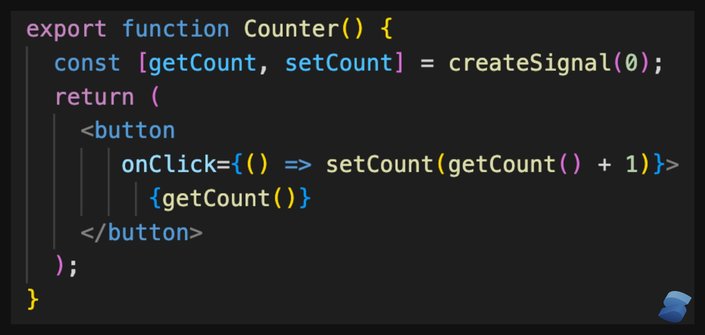
createSignal(): allocates theStateStorageand initializes it to0.
createSignal():分配StateStorage并将其初始化为0。getCount: a reference to the store that you can pass around.
getCount:对可以传递的商店的引用。getCount(): says retrieve the state value.
getCount():表示检索状态值。
The above explains how Signals are different from the good old state but does not explain why we should care.
上面解释了信号与良好的旧状态有何不同,但没有解释为什么我们应该关心。
Signals are reactive! This means that they need to keep track of who is interested in the state (subscriptions) and, if the state changes, notify the subscribers of the state change.
信号是反应性的!这意味着他们需要跟踪谁对状态(订阅)感兴趣,并且如果状态发生变化,则通知订阅者状态变化。
To be reactive, Signals must collect who is interested in the Signal’s value. They gain this information by observing in what context the state-getter is invoked. By retrieving the value from the getter, you are telling the signal that this location is interested in the value. If the value changes, this location needs to be re-evaluated. In other words, invoking the getter creates a subscription.
为了做出反应,信号必须收集谁对信号的价值感兴趣。他们通过观察状态获取器在什么上下文中被调用来获取此信息。通过从 getter 检索值,您可以告诉信号该位置对该值感兴趣。如果值发生变化,则需要重新评估该位置。换句话说,调用 getter 会创建一个订阅。
This is why passing the state-getter rather than the state-value is important. The passing of state-value does not give the signal any information about where the value is actually used. This is why distinguishing between state-reference and state-value is so important in signals.
这就是为什么传递状态获取器而不是状态值很重要。状态值的传递不会向信号提供有关该值实际使用位置的任何信息。这就是为什么区分状态参考和状态值在信号中如此重要。
For comparison, here is the same example in Qwik. Notice that (getter/setter) has been replaced with a single object with a .value property (which represents the getter/setter). While the syntax is different, the inner workings remain the same.
为了进行比较,这里是 Qwik 中的相同示例。请注意, (getter/setter) 已被替换为具有 .value 属性(代表 getter/setter)的单个对象。虽然语法不同,但内部工作原理保持不变。
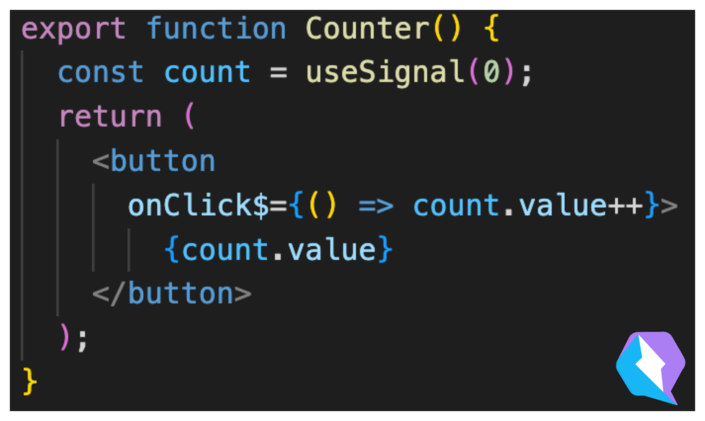
Importantly, when the button is clicked and the value is incremented, the framework only needs to update the text node from 0 to 1. It can do that because, during the initial rendering of the template, the Signal has learned the count.value has been accessed by the text node only. Therefore it knows that if the value of the count changes, it only needs to update the text node and nothing else.
重要的是,当单击按钮并且值递增时,框架只需将文本节点从 0 更新为 1 。它可以做到这一点,因为在模板的初始渲染期间,信号已获知 count.value 仅由文本节点访问。因此它知道如果 count 的值发生变化,它只需要更新文本节点而无需更新其他内容。
Let’s look at how React uses useState() and its shortcomings.
我们来看看React是如何使用 useState() 的以及它的缺点。
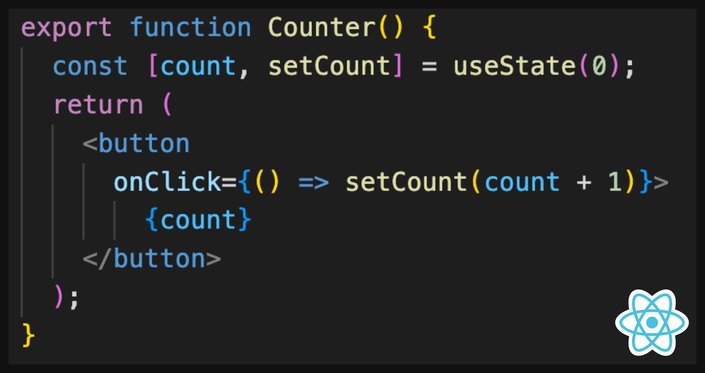
React useState() returns a state-value. This means that useState() has no idea how the state-value is used inside the component or the application. The implication is that once you notify React of state change through a call to setCount(), React has no idea which part of the page has changed and therefore must re-render the whole component. This is computationally expensive.
React useState() 返回一个状态值。这意味着 useState() 不知道状态值如何在组件或应用程序内部使用。这意味着,一旦您通过调用 setCount() 通知 React 状态更改,React 就不知道页面的哪一部分已更改,因此必须重新渲染整个组件。这在计算上是昂贵的。
React has useRef(), which is similar to useSignal(), but it does not cause the UI to re-render. This example looks very similar to useSignal() but it will not work.
React 有 useRef() ,与 useSignal() 类似,但它不会导致 UI 重新渲染。这个例子看起来与 useSignal() 非常相似,但它不起作用。
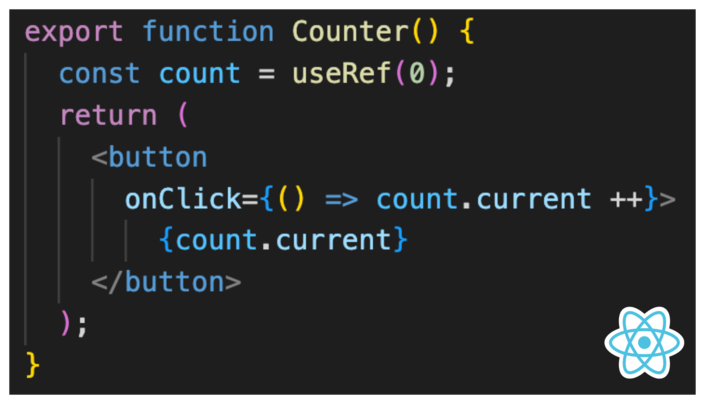
useRef() is used exactly like a useSignal() to pass a reference to the state rather than the state itself. What useRef() lacks are subscription tracking and notifications.
useRef() 的用法与 useSignal() 完全相同,用于传递对状态的引用而不是状态本身。 useRef() 缺少的是订阅跟踪和通知。
The nice thing is that in signal-based frameworks, useSignal() and useRef() are the same thing. useSignal() can do what useRef() does plus subscription tracking. This further simplifies the API surface of the framework.
好处是,在基于信号的框架中, useSignal() 和 useRef() 是同一件事。 useSignal() 可以做 useRef() 所做的事情以及订阅跟踪。这进一步简化了框架的 API 界面。
Signals rarely require memoization because they do the least amount of work out of the box.
信号很少需要记忆,因为它们开箱即用的工作量最少。
Consider this example of two counters and two children components.
考虑这个包含两个计数器和两个子组件的示例。
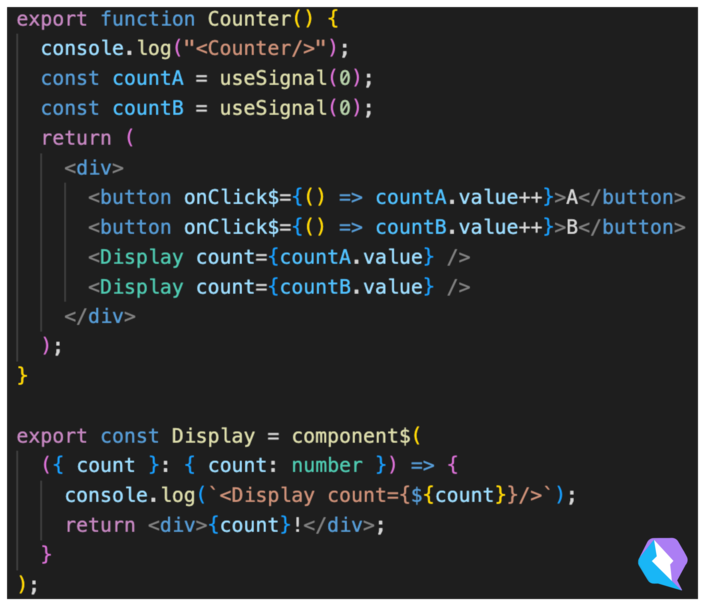
In the above example, only the text node of one of the two Display components will be updated. The text node that doesn't get updated will never print after the initial render.
在上面的示例中,只会更新两个 Display 组件之一的文本节点。未更新的文本节点在初始渲染后将永远不会打印。
# Initial render output<Counter/>
<Display count={0}/>
<Display count={0}/>

# Subsequent render on click(blank)
You actually can’t achieve the same in React because, at the very least, at least one component needs to re-render. So let’s look at how to memoize components in React to minimize the amount of re-rendering.
实际上在 React 中你无法实现同样的目标,因为至少,至少有一个组件需要重新渲染。那么让我们看看如何在 React 中记忆组件以最大程度地减少重新渲染的次数。
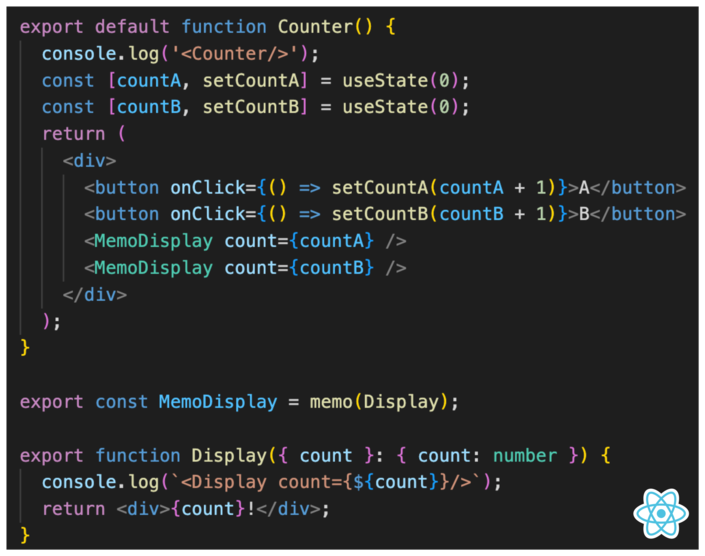
But even with memoization, React will rerun the re-render much more.
但即使有了记忆,React 也会重新运行更多的重新渲染。
# Initial render output<Counter/>
<Display count={0}/>
<Display count={0}/>

# Subsequent render on click<Counter/>
<Display count={1}/>
Without memoization, we would see:
如果没有记忆,我们会看到:
# Initial render output<Counter/>
<Display count={0}/>
<Display count={0}/>

# Subsequent render on click<Counter/>
<Display count={1}/>
<Display count={0}/>
That is a lot more work than what Signals have to do. So, this is why signals work as if you memoized everything without actually having to memoize anything yourself.
这比 Signals 要做的工作要多得多。因此,这就是为什么信号的工作方式就好像您记住了所有内容,而实际上不必自己记住任何内容。
Let’s take a common example of implementing a shopping cart.
让我们举一个实现购物车的常见示例。
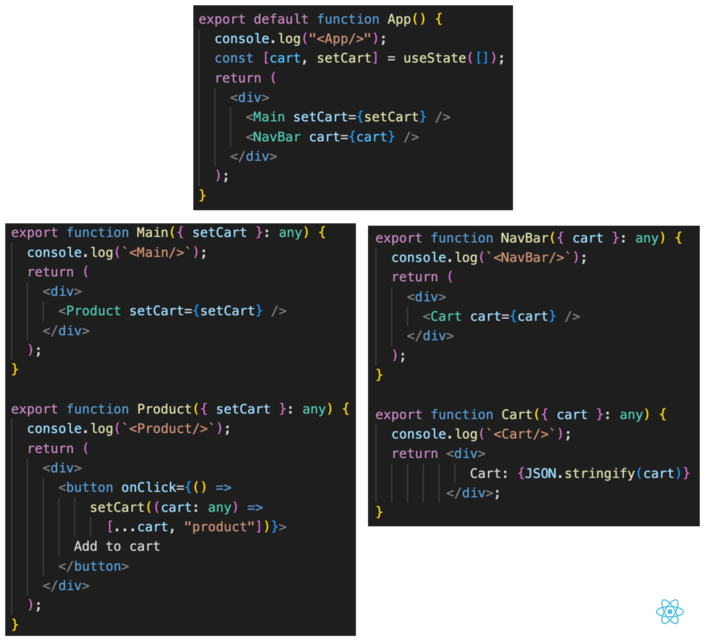
The state of the cart is usually pulled up to the highest common parent between the buy button and where the cart is rendered. Because the buy button and the cart are far apart in the DOM, this often is very close to the top of the component render tree. In our case, we call it the common ancestor component.
购物车的状态通常会被拉到购买按钮和呈现购物车的位置之间的最高公共父级。由于购买按钮和购物车在 DOM 中相距较远,因此通常非常接近组件渲染树的顶部。在我们的例子中,我们将其称为共同祖先组件。
The common ancestor component has two branches:
共同祖先组件有两个分支:
- One which drills the
setCartfunctions through many layers of components until it reaches the buy button.
一种通过多层组件钻取setCart功能,直到到达购买按钮。 - The other drills the
cartstate through many layers of components until it reaches the component which renders the cart.
另一个通过多层组件钻取cart状态,直到到达呈现购物车的组件。
The problem is that every time you click the buy button, most of the component tree has to rerender. This leads to an output similar to this:
问题是,每次单击购买按钮时,大部分组件树都必须重新渲染。这会导致类似于以下的输出:
# "buy" button clicked<App/>
<Main/>
<Product/>
<NavBar/>
<Cart/>
If you do use memoization then you can avoid the setCart prop-drilling branch but not the cart prop-drilling branch, so the output would still look like so:
如果您确实使用记忆化,那么您可以避免 setCart prop-drilling 分支,但不能避免 cart prop-drilling 分支,因此输出仍然如下所示:
# "buy" button clicked<App/>
<NavBar/>
<Cart/>
With signals, the output is like so:
对于信号,输出如下:
# "buy" button clicked<Cart/>
This greatly reduces the amount of code that needs to execute.
这大大减少了需要执行的代码量。
Some of the more popular frameworks which support signals are Vue, Preact, Solid, and Qwik.
支持信号的一些更流行的框架包括 Vue、Preact、Solid 和 Qwik。
Now, signals are not new; they have existed in Knockout and probably other frameworks before then. What is different is that signals have greatly improved their DX in recent years through clever compiler tricks and deep integration with JSX, which makes them very succinct and a pleasure to use — and that part is genuinely new.
现在,信号并不是什么新鲜事。在此之前它们已经存在于 Knockout 和可能的其他框架中。不同的是,信号近年来通过巧妙的编译器技巧和与 JSX 的深度集成极大地改进了它们的 DX,这使得它们非常简洁并且使用起来很愉快——而且这部分是真正的新部分。
A signal is a way to store state in an application, similar to useState() in React. However, the key difference is that signals return a getter and a setter, whereas non-reactive systems return only a value and a setter.
信号是在应用程序中存储状态的一种方式,类似于 React 中的 useState() 。然而,关键的区别在于信号返回一个 getter 和一个 setter,而非响应式系统仅返回一个值和一个 setter。
It is important because signals are reactive, meaning they need to keep track of who is interested in the state and notify subscribers of state changes. This is achieved by observing the context in which the state-getter is invoked, which creates a subscription.
这很重要,因为信号是反应性的,这意味着它们需要跟踪谁对状态感兴趣并通知订阅者状态更改。这是通过观察调用状态获取器的上下文来实现的,这会创建订阅。
In contrast, useState() in React returns only the state-value, meaning it has no idea how the state-value is used and must re-render the whole component tree in response to state changes.
相比之下,React 中的 useState() 仅返回状态值,这意味着它不知道状态值如何使用,并且必须重新渲染整个组件树以响应状态更改。
In recent years signals have reached a DX which makes them no harder to use than traditional systems. For this reason, I think the next framework you will use will be reactive and based on signals.
近年来,信号已经达到了 DX,这使得它们并不比传统系统更难使用。因此,我认为您将使用的下一个框架将是响应式的并且基于信号。

No setup needed. 100% free. Supports all popular frameworks.